Azure Microservices Architecture: Deployment, Best Practices and Examples
A practical guide to Azure microservices: how to choose between Container Apps and AKS, deploy step by step, secure every service, and lay out a real order-processing system.
Key Takeaways
Start with Azure Container Apps, and use AKS when you need Kubernetes control.
Use API Management at the edge and Service Bus between services.
Give each service its own identity and its own database.
Release each service through its own pipeline, with tracing from day one.
Most Azure microservices projects don't stumble on the architecture diagram. They stumble on a question nobody asked early enough: where does this actually run, and who's operating it at 2 a.m.? Azure gives you several reasonable answers. Pick the wrong one and a six-service app ends up on a Kubernetes cluster that nobody fully understands.
This guide covers the Azure side: which services do what, how to choose between Container Apps and AKS, how a deployment flows from code to production, and what to lock down before real traffic arrives. Still deciding whether to split your app at all? Start with our .NET microservices architecture guide, which covers the modular monolith question, then come back for the Azure specifics.
What Azure Microservices Actually Means
Microservices on Azure means splitting an application into small services that each own one business capability and their own data, then running each on an Azure compute service you can deploy, scale, and secure independently. The architecture style is the same on any cloud. What Azure adds is the plumbing: managed hosting, messaging, gateways, identity, and monitoring, all billed and governed in one place.
That's also why "Azure microservices vs AKS" is a slightly muddled question. Microservices is how you design the application. AKS is one place to run it. The real decision is which Azure service hosts your services.
Azure Microservices Architecture: The Building Blocks
Whatever you build, a production setup tends to need the same handful of pieces. Here's how they map to Azure.
Concern
Azure Service
What It Handles
Compute
Azure Container Apps, AKS, Azure Functions
Runs your services and scales them
API gateway
Azure API Management
Auth, throttling, routing, and versioning at the edge
What It HandlesWho calls whom, with no passwords in code
Observability
ConcernObservability
Azure ServiceAzure Monitor, Application Insights
What It HandlesLogs, metrics, and distributed traces
Delivery
ConcernDelivery
Azure ServiceAzure DevOps or GitHub Actions
What It HandlesBuild, test, and release pipelines
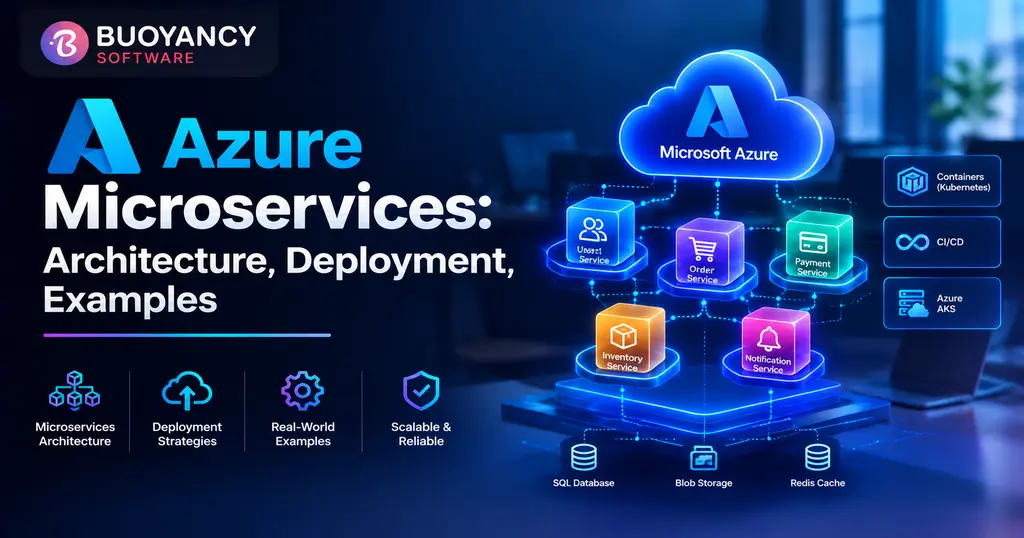
Microsoft's own AKS microservices reference architecture follows this shape. An ingestion service drops work onto a Service Bus queue, a workflow service picks it up and calls other services over HTTPS, and Cosmos DB and Redis hold state.
Azure Container Apps vs AKS for Microservices: How to Choose
This decision shapes everything downstream, so it deserves a straight answer. Microsoft's guidance for microservices says to start with Container Apps when you want built-in service discovery, Dapr, and per-app scaling without managing a cluster. Choose AKS when you need direct Kubernetes API access, a custom service mesh, or fine control over node pools and network policies.
Platform
Service Discovery
Async Messaging
Pick It When
Azure Container Apps
Built in, plus Dapr
Dapr pub/sub; KEDA scales on queue depth
You want microservices building blocks without running a cluster
AKS
Kubernetes DNS or a service mesh
App-level, such as Service Bus clients
You need the Kubernetes API, a custom mesh, or node-level control
Azure Functions
None built in; handled in code
Triggers and bindings
Small, event-driven units of work
Azure Container Apps
PlatformAzure Container Apps
Service DiscoveryBuilt in, plus Dapr
Async MessagingDapr pub/sub; KEDA scales on queue depth
Pick It WhenYou want microservices building blocks without running a cluster
AKS
PlatformAKS
Service DiscoveryKubernetes DNS or a service mesh
Async MessagingApp-level, such as Service Bus clients
Pick It WhenYou need the Kubernetes API, a custom mesh, or node-level control
Azure Functions
PlatformAzure Functions
Service DiscoveryNone built in; handled in code
Async MessagingTriggers and bindings
Pick It WhenSmall, event-driven units of work
Container Apps runs on Kubernetes underneath, but you never touch the cluster. It autoscales on HTTP traffic, events, CPU, or memory, and most apps can scale to zero, at which point you aren't billed usage charges for them. One catch: Container Apps requires Linux containers, so a .NET Framework service has to be ported to modern .NET before it can move there.
AKS earns its extra complexity in specific situations. Microsoft's container service comparison offers a realistic one: a team prefers a PaaS like Container Apps, but the security team requires deny-by-default network controls between components, so they land on AKS anyway. If your requirements read like that, skip the debate. Teams wanting AKS with less setup should look at AKS Automatic, which Microsoft groups with Container Apps among the simpler options.
A quick word on Service Fabric, since older tutorials still lean on it. Service Fabric clusters remain supported, though in our experience most new builds start on Container Apps or AKS. Service Fabric Mesh is another story: Microsoft retired it and ended support for existing deployments in April 2021. If a guide tells you to deploy there, close the tab.
Interservice Communication, API Gateways, and Patterns
Put a gateway at the edge. Azure API Management works as a facade in front of your services, so you can reshape or move backends without breaking clients. It also handles the cross-cutting work: validating Microsoft Entra tokens, rate limiting, caching, and authenticating to backends with a managed identity.
Between services, mix two styles. Use synchronous HTTP or gRPC when the caller truly needs an answer right now. For everything else, lean on event-driven architecture with Azure Service Bus: queues when one consumer handles each message, topics when several services care about the same event. KEDA can scale a consumer up when messages pile up and back down when they don't.
One timely catch for .NET teams. Microsoft retired the older Service Bus SDKs (WindowsAzure.ServiceBus and Microsoft.Azure.ServiceBus) on September 30, 2026. Existing code keeps running, but fixes only land in Azure.Messaging.ServiceBus, so put that migration on your backlog.
Pattern
Problem It Solves
The Azure Way
Gateway routing and offloading
Clients shouldn't need to know your service layout
API Management policies
Circuit breaker and retry
One failing dependency drags down its callers
Resilience libraries in service code, such as Polly for .NET
Saga
A business transaction spans several services
Service Bus messages with compensating steps, or Durable Functions
Strangler Fig
Migrating a monolith piece by piece
Route new paths to new services through the gateway
Gateway routing and offloading
PatternGateway routing and offloading
Problem It SolvesClients shouldn't need to know your service layout
The Azure WayAPI Management policies
Circuit breaker and retry
PatternCircuit breaker and retry
Problem It SolvesOne failing dependency drags down its callers
The Azure WayResilience libraries in service code, such as Polly for .NET
Saga
PatternSaga
Problem It SolvesA business transaction spans several services
The Azure WayService Bus messages with compensating steps, or Durable Functions
Strangler Fig
PatternStrangler Fig
Problem It SolvesMigrating a monolith piece by piece
The Azure WayRoute new paths to new services through the gateway
How to Deploy Microservices on Azure, Step by Step
Once the platform choice is made, the mechanics are refreshingly boring, and that's the goal. Here's the path most teams follow.
Containerize each service. One service, one Dockerfile, one versioned image. Don't bundle several services into a single image just to save a pipeline.
Create an Azure Container Registry. Push images there. The az acr build command can build the image inside the registry, so nobody needs Docker installed on a build machine.
Create the hosting environment. That's a Container Apps environment, or an AKS cluster with the registry attached so nodes can pull images.
Deploy each service with a managed identity. The identity pulls from the registry, which means no registry passwords sitting in a pipeline. Grant it the AcrPull role on the registry first.
Let a pipeline do the releasing. Azure Pipelines or GitHub Actions should build, test, push, and deploy every merge, one pipeline per service, so independent deployment is real and not just a slide.
Release gradually. Container Apps keeps multiple revisions and can split traffic between them for blue-green or A/B rollouts. On AKS, use rolling updates or canary releases.
A simplified example with placeholder names. Internal ingress keeps a backend service reachable only from inside the environment; how your gateway reaches it depends on your network setup.
Deploying microservices using Azure Kubernetes Service follows the same arc. Steps one, two, five, and six stay as they are. In step three you create the cluster and attach the registry. In step four you apply Kubernetes manifests or Helm charts, with an ingress controller or the Kubernetes Gateway API handling external traffic, which is how Microsoft's reference architecture exposes its services.
A Worked Example: Order Processing on Azure
Here's how those pieces fit together in a familiar scenario: an online store where each order triggers payment, a stock update, and a confirmation email.
Communicates ViaPublishes an order-placed event to Service Bus
Payment service
ComponentPayment service
Runs OnContainer Apps
Owns Data InIts own Azure SQL database
Communicates ViaSubscribes to order-placed, replies with an event
Inventory service
ComponentInventory service
Runs OnContainer Apps
Owns Data InAzure Cosmos DB
Communicates ViaSubscribes to order-placed, scaled by KEDA on topic depth
Notification function
ComponentNotification function
Runs OnAzure Functions
Owns Data InNone
Communicates ViaTriggered by a Service Bus message, sends the email
Notice what's missing. No service reads another service's database, and the orders API never waits on the email. If the notification function falls behind, messages queue up in Service Bus and customers still see their order confirmation.
Azure Microservices Security Best Practices
Security on Azure is mostly about not having secrets to leak in the first place. Microsoft Entra ID, formerly Azure Active Directory, does most of the heavy lifting.
Layer
Practice
Identity
Give each service its own managed identity and grant only the roles it needs, such as Service Bus Data Sender or Data Receiver
Secrets
Keep whatever remains in Azure Key Vault, not in environment variables or config files
Messaging
Turn off shared access key authentication on Service Bus where you can, and allow Microsoft Entra authentication only
Network
Use private endpoints for Container Registry and Key Vault, and consider Network Security Perimeter, as Microsoft's AKS reference architecture does
Edge
Validate tokens and rate limit in API Management, and add Microsoft Defender for APIs for runtime protection
Identity
LayerIdentity
PracticeGive each service its own managed identity and grant only the roles it needs, such as Service Bus Data Sender or Data Receiver
Secrets
LayerSecrets
PracticeKeep whatever remains in Azure Key Vault, not in environment variables or config files
Messaging
LayerMessaging
PracticeTurn off shared access key authentication on Service Bus where you can, and allow Microsoft Entra authentication only
Network
LayerNetwork
PracticeUse private endpoints for Container Registry and Key Vault, and consider Network Security Perimeter, as Microsoft's AKS reference architecture does
Edge
LayerEdge
PracticeValidate tokens and rate limit in API Management, and add Microsoft Defender for APIs for runtime protection
Monitoring Azure Microservices
A request that crosses five services can't be debugged from one log file. Azure Monitor collects logs, metrics, and traces, and Application Insights turns the traces into a picture of where a request went and where it slowed down. Enable distributed tracing in every service from day one, and carry correlation IDs through Service Bus messages so a queue hop doesn't break the trail. Once traffic is real, tools like the Azure SRE Agent can take first-pass incident investigation off your team's plate.
Azure Microservices Best Practices and Common Mistakes
Practice
The Mistake It Prevents
One database per service
A shared schema that quietly couples every team
Start on Container Apps unless you can name the Kubernetes feature you need
Operating a cluster for a six-service app
Async messaging for anything that doesn't need an immediate answer
Chains of synchronous calls that fail together
Managed identities everywhere
Connection strings in config files, forever
Tracing before launch
Debugging a distributed failure across five separate logs
One database per service
PracticeOne database per service
The Mistake It PreventsA shared schema that quietly couples every team
Start on Container Apps unless you can name the Kubernetes feature you need
PracticeStart on Container Apps unless you can name the Kubernetes feature you need
The Mistake It PreventsOperating a cluster for a six-service app
Async messaging for anything that doesn't need an immediate answer
PracticeAsync messaging for anything that doesn't need an immediate answer
The Mistake It PreventsChains of synchronous calls that fail together
Managed identities everywhere
PracticeManaged identities everywhere
The Mistake It PreventsConnection strings in config files, forever
Tracing before launch
PracticeTracing before launch
The Mistake It PreventsDebugging a distributed failure across five separate logs
None of this is exotic. Teams get hurt by skipping the dull items, not by missing a clever pattern.
What Azure Microservices Cost
Cost follows the hosting choice more than anything else. Container Apps bills usage only while replicas run, though not every workload profile scales to zero, so check yours before assuming idle means free. An AKS cluster needs running nodes for your workloads and its own system components, so you pay for that capacity whether traffic arrives or not. AKS starts to make economic sense once you have enough steady services to keep those nodes busy.
A two-service proof of concept makes a fine weekend project. Production Azure microservices development is a different job: private networking, identity design, a pipeline per service, cost guardrails, and a hosting decision you'll live with for years. That's usually the point to hire Azure developers who have shipped this before, ideally before the first service goes live, since switching hosting platforms later means rebuilding pipelines, networking, and scaling rules.
Why This Guide
Buoyancy Software is a Microsoft Solutions Partner and ISO 27001 certified custom software and IT consulting company, with delivery teams in Ahmedabad, India and Edison, New Jersey. This guide reflects how our engineers choose hosting platforms and draw service boundaries on Azure for client projects.
Planning Microservices on Azure and Not Sure Where to Start?
The expensive mistakes happen before the first service ships: the wrong hosting platform, boundaries drawn in the wrong place, security bolted on late. Buoyancy Software's custom application development team designs and builds Azure microservices with the platform choice, pipelines, and guardrails settled up front.
Book a free consultation and get a straight recommendation on Container Apps, AKS, or something simpler.
Get answers to the most common questions about our products, services, and policies.
What are Azure microservices?
Azure microservices are applications built as small, independently deployable services that each own their data, running on Azure services such as Container Apps, AKS, or Functions, with API Management, Service Bus, and Azure Monitor around them.
Azure Container Apps vs AKS for microservices: which should I choose?
Start with Container Apps if you want built-in service discovery, Dapr, and scale to zero without running a cluster. Choose AKS when you need Kubernetes API access, a custom service mesh, or control over node pools and network policies.
Azure microservices vs AKS: what's the difference?
They aren't alternatives. Microservices is an architecture style, while AKS is a managed Kubernetes service that can host microservices. The real choice is among hosting options such as Container Apps, AKS, and Azure Functions.
How do I deploy microservices on Azure?
Containerize each service, push the images to Azure Container Registry, deploy to Container Apps or AKS using a managed identity for image pulls, and release through a pipeline that builds, tests, and deploys each service independently.
How do you secure microservices on Azure?
Give every service a managed identity, keep remaining secrets in Key Vault, restrict Service Bus to Microsoft Entra authentication, use private endpoints for registries and vaults, and validate tokens and rate limits at an API Management gateway.
Can Azure Functions be used for microservices?
Yes, for small event-driven pieces. Functions have no built-in service discovery, so they usually sit beside Container Apps or AKS services, and they can also run on Container Apps.